

🎯 What Are Targeted Lists?
Targeted Lists let you choose specific comic titles and send emails only to customers who subscribe to those titles.
👉 Perfect for things like:
Announcing a hot new story arc in a series
Promoting tie-in one-shots or special editions
Reminding fans about new volumes of their favorite manga
This way, you’re talking directly to the readers who care—without flooding everyone else’s inbox.
🛠 How to Send a Targeted List Email
Start a new campaign
Go to the Email Campaigns section and click Create Campaign.
Pick your campaign type
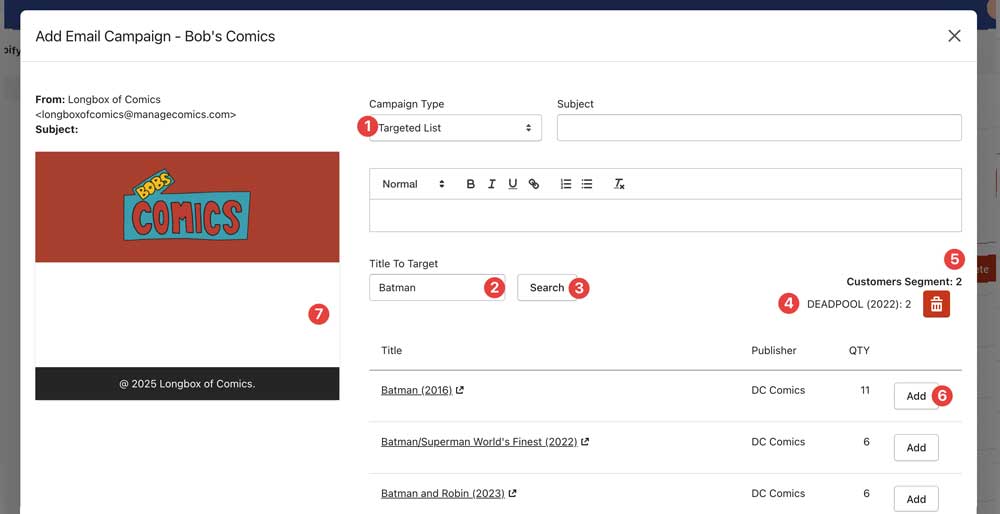
From the Campaign Type dropdown, select Targeted List (1).
Search for titles
A search box labeled Select Title to Target will appear (2).
Enter keywords (like Batman or One Piece) to find titles, and hit "Search" (3).
Results will display in a list with:
Title (clickable to open in a new tab)
Publisher
QTY (# of Subscribers)
Select your audience
Use the Add button (6) to select one or more titles.
The titles you have selected will show up in the Titles list (4).
The Customers Targeted counter (5) updates as you go.
If a customer subscribes to more than one selected title, don’t worry—they’re only counted once, people who have opted out of marketing emails will not count in your overall total.
Compose your email
Write your subject line and message just like any other campaign.
Preview and send
Make sure everything looks good in the preview.
Click Create to send to the targeted list.
✏️ Important Notes
If no titles are selected, the Create button stays disabled.
If your search returns nothing, you’ll see a clear “No titles found” message.
Customers with inactive subscriptions are automatically excluded.
Customers who have unsubscribed from emails will not receive the campaign (and won’t appear in your targeted count).
⚡ Behind the Scenes
De-duplication: Customers subscribed to multiple selected titles will still only get one email.
Pagination: Search results are displayed in pages of 25, with controls at the bottom to flip between pages.
Dynamic count: The “Customers Targeted” number updates instantly as you add or remove titles.